
If you belong to the Etsy community, you're most likely familiar with Timothy Adams of the Handmadeology fame. Yep, he's the guy who very generously shares loads of tips and information on how to market your products efficiently and successfully. He spends hours creating detailed tutorials and blog posts to help make things easy for etsy sellers. His most recent post was about how to make use of Facebook to market yourself, you can find it on his Etsy Secrets blog.
The blog post gives detailed information, complete with screenshots, on what information and applications to add to your Facebook Profile and Fan Page and how to further promote them.
After reading this post, Donna of Creative Treasures, a dear friend of mine who makes gorgeous lampwork and crystal jewelry had a couple of clarifications. Since she's very new to facebook and I live half my life on it, she approached me with a few questions, one of which was exactly how to make a Facebook Fan Page in the first place.
Inspired by Timothy's effort, I also decided to create a tutorial and share it here on my blog. It might not be as professionally done but it's basic, easy to use information and I hope it helps you create your own fan page on facebook.
You need to already have a facebook account to have a fan page. This page is different from your personal profile.
1. You start by adding an application called Pages. The easiest way to find a link to this application is by going to someone else's pre-existing fan page and finding the 'Create a page for my business' link. Here's a screen shot of my Art by Susmitha Page. You can see that the link you're looking for at the bottom of the left hand column (click pic to see a larger version).

2. Add the application and you will be taken to the 'Create New Facebook Page' link where you enter the first bit of information.
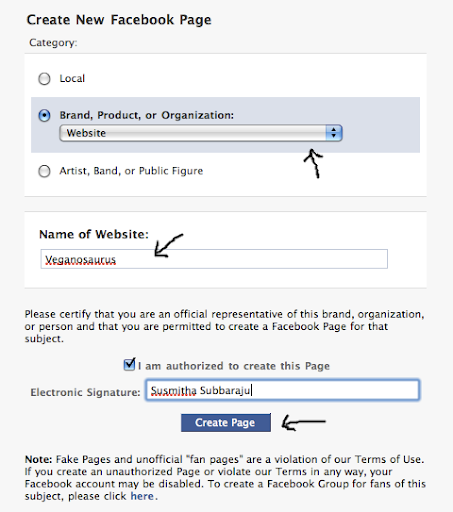
3. Now your new, empty fan page has been created. Begin by clicking on the 'Edit Information' link.

4. Enter the basic and detailed information. Hit 'Save Changes' at the bottom and then 'Done Editing on top'.

5. Now you'll be taken back to your main page where you can add your website info and URL and also a profile picture of your logo or product. When you hover over the top right corner of the profile picture space, the edit icon will appear.

6. After you've got your pic and URL info added, go on to edit the page by clicking 'Edit Page'.

7. This will take you to the Settings and Applications page. Make any adjustments you'd like here.

8. Then scroll to the bottom of the Settings and Applications page. Click on the edit icon at the corner of 'More Applications' and browse for more apps.

9. To add your Etsy Mini to your page do a search for 'my stuff' and click on the 'gigya my stuff' application and add it.

10. Go back to your page, click on the + sign next to the Wall, Info, Photos... tabs. Add the 'My Stuff' application to your tabs.

11. Follow the instructions and paste the flash version (larger code) of the code into the box (the java version cannot be added). Now you have your etsy mini tab all set.

12. Finally, click on the 'Photos' tab and add loads of images of your products.

Your basic fan page is now ready. Hit the 'Publish This Page' link (its in red) on top and tell all your friends about it :)


